
# Best Security Practices
A working Krayin install is only as secure as the server it runs on. This page collects the hardening steps every production deployment should apply — software hygiene, attack-surface reduction, HTTP headers, and ongoing monitoring.
# 🔒 Software updates
The single highest-leverage practice. Keep everything patched:
- Force HTTPS — encrypted by default, and a Google ranking factor.
- Keep Krayin itself up to date.
- Keep your database, Adminer / phpMyAdmin, web server, Redis, and any other service patched.
- Apply OS-level security updates on a schedule.
- Manage files only over SSH / SFTP / HTTPS. Disable FTP completely.
- On Apache deployments, use
.htaccessto lock down system files. - Disable unused ports and stop services you're not running.
# 🛡️ Limit admin exposure
- Whitelist specific IP addresses for the admin URL.
- Enforce two-factor authentication on admin accounts.
- Require strong, unique passwords (see Strong passwords below).
- Configure the firewall to allow only ports 80 (HTTP) and 443 (HTTPS) from the public internet.
# Restrict by IP via .htaccess
RewriteEngine On
RewriteCond %{REQUEST_URI} .*/admin
RewriteCond %{REMOTE_ADDR} !=<your IP address>
RewriteCond %{REMOTE_ADDR} !=<another IP address>
RewriteRule ^(.*)$ - [R=403,L]
Remove all development leftovers from the server: log files, .git directories, database dumps, zip archives, etc.
# 🚫 Limit error message leakage
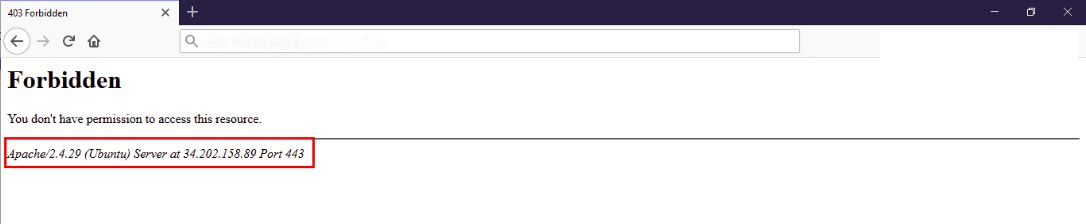
Verbose Apache errors expose the server version and OS. Edit your Apache config and add:
ServerSignature Off
ServerTokens Prod
Screenshot
# 📁 Restrict unnecessary file access
Block direct access to files that shouldn't be served:
<FilesMatch "\.(git|zip|tar|sql)$">
    Require all denied
</FilesMatch>
Pair this with a Web Application Firewall (WAF) to inspect traffic for suspicious patterns (e.g. credit-card data being exfiltrated).
# 🚫 Disable PHP execution inside storage/
User uploads land in storage/. Disabling PHP execution there prevents an attacker who slips a .php file through an upload from running code:
<Directory "~/www/krayin/public/storage/">
    <FilesMatch "\.php$">
        Require all denied
    </FilesMatch>
    php_flag engine off
</Directory>
Restart Apache after editing.
# ⚙️ Server hardening
| Step | What it does |
|---|---|
mod_security | Apache module that detects + blocks common intrusion patterns. |
mod_passive | Brute-force protection. |
| User allow-list | Only specific OS users can SSH in. |
| Disable empty-password logins | Self-explanatory. |
iptables review | Audit and lock down rules quarterly. |
| Off-site backups | Back up critical files to a separate location on a schedule. |
# 🔑 Strong passwords
Enforce strong, unique passwords for every account — admin, database, OS users, third-party integrations. Tools like the Password Generator (opens new window) make rotation painless.
Rotate the admin-panel IP whitelist when staff change.
# 🌐 HTTP security headers
Add these response headers via your web server config or Laravel middleware. Each one closes a specific class of browser-side attacks.
# Strict-Transport-Security (HSTS)
Forces the browser to use HTTPS even if a user types http://:
Strict-Transport-Security: max-age=<expire-time>
# X-XSS-Protection
Asks the browser to enable its built-in XSS filter:
X-XSS-Protection: 1; mode=block
# X-Frame-Options
Stops your admin from being embedded in an iframe — the standard defence against clickjacking:
X-Frame-Options: deny
# X-Content-Type-Options
Disables MIME sniffing, which prevents attackers from tricking the browser into running uploaded files as scripts:
X-Content-Type-Options: nosniff
# Content Security Policy (CSP)
A whitelist of where the browser may load resources from. Properly configured CSP is the strongest browser-side defence against XSS and content injection — see the MDN CSP guide (opens new window) for the syntax.
# 📊 Continuous logging and monitoring
Hardening is a process, not a one-shot. Maintain ongoing visibility:
- Centralise web-server, application, and database logs.
- Alert on auth failures, 5xx spikes, and unusual outbound traffic.
- Watch for business-level anomalies — large volumes of leads coming from one IP, mass exports outside business hours, repeated password resets for the same account.
A patched server plus active monitoring catches the majority of real-world threats before they cause damage.